Viewing Trip Reports
The Reports page provides detailed summaries of your trips.
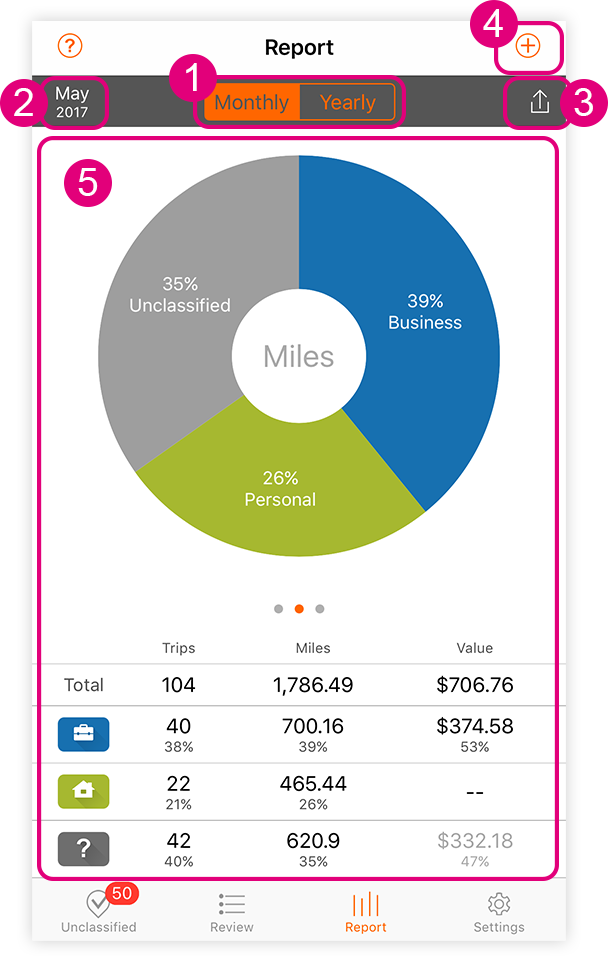
- Report period options: (a) Monthly or (b) Yearly
- Tap the time period to change it. Applies to both the monthly and yearly options.
- Export
Reports may be exported as either: (a) PDF or (b) CSV file. - Add a trip manually
Refer to the ‘Adding a Trip Manually’ section for help about this page. - Summary of classified trips
Summarizes all classified trips for the selected time period and displays the data in a series of donut chart. The trip data provided in the report include:- Classification type
- Total number of trips for each classification
- Total miles for each classification
- The calculated value for each classification
- Sum total of all classified trips along with associated miles and value for the selected time period