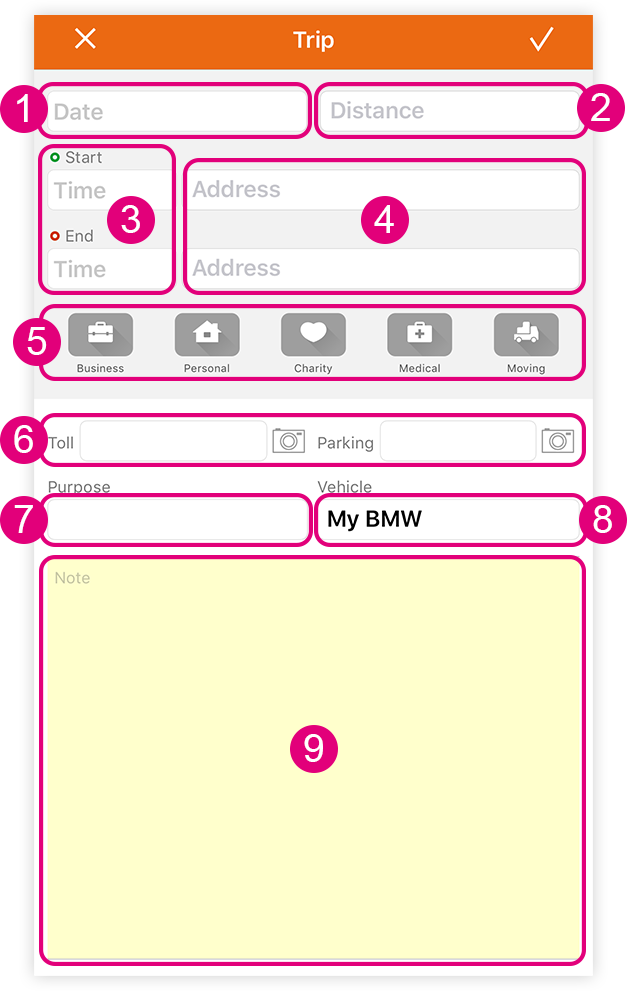
Adding a Trip Manually
You have the option to manually enter trips in Mileage Log.
- Enter the date of the trip.
- Log the trip distance.
- Enter the Start and End times for the trip.
- Enter Starting and Ending Address.
Heuristic search is supported, so when you start entering an address, matching locations will appear in a suggestion bar. - Classify the trip*.
* NOTE: In order for Mileage Log to be able to calculate your travel expense, a trip classification must be selected.
- Add tolls and parking expenses.
- Add a trip purpose.
A suggestion bar will appear when you start entering your purpose. - Identify the vehicle used for the trip.
Add or edit the vehicles you want to use in Mileage Log in Settings > General > Vehicle. A suggestion bar will appear when you start entering your vehicle information. - Include helpful notes about the trip.